G-YWWN0NYSS1 Advanced SAPUI5 - 8 – How to Use Python to Get Weight for SAPUI5 Fiori Apps from the Weigh Scale/Weigh Bridge? - TECHNICAL GYAN GURU Advanced SAPUI5 - 8 – How to Use Python to Get Weight for SAPUI5 Fiori Apps from the Weigh Scale/Weigh Bridge? - TECHNICAL GYAN GURU

Advanced SAPUI5 – 8 – How to Use Python to Get Weight for SAPUI5 Fiori Apps from the Weigh Scale/Weigh Bridge?

As promised, I will keep writing on SAPUI5, which is a rather complicated topic for which it is difficult to locate tutorial resources.

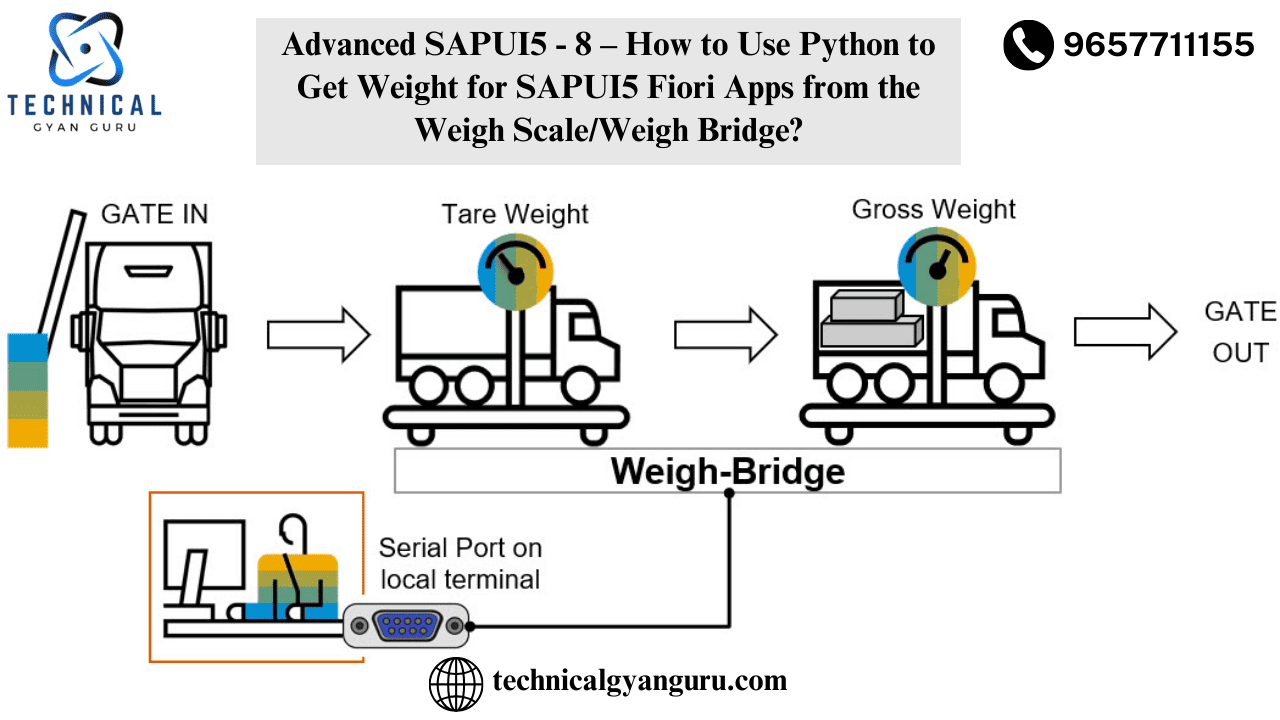
Today, let’s look at a very real-world case. Are you aware of how shipping and freight companies handle a product’s weight? or in any other industry, such as airports? One person must interpret the reading and communicate the value to another, possibly distant person, in order to determine the weight of a bag. This back and forth between the data takes time, and human mistake could occur. Technical gyan guru is here to help you avoid this mistake and enhance response time. 🙂 Check out this post that demonstrates how to use Python in SAPUI5 to obtain weight. I’m quite sure this is the only blog on the internet that explains this special fix. 😛

Step1:- Create a SAPUI5 project in WebIDE

Step2:- Create a button and input box on screen

Step3:- Execute Python Service and get the Service URI

Run the Python service that hosts the data from the comport, and use the command line to obtain its service URI. You can host data on an intranet in real time, making it available to all Fiori apps.

Step 4: Read the data and integrate this service with the SAPUI5 app.

Testing Time

Verify that the request that brought in the Python data is available as indicated below.

You can use the service for anything you need once you have it. Now it’s your baby.

If you haven’t done much work on SAPUI5 development, you probably have some questions.We also don’t charge a consultancy fee to respond to your questions.Please ask any questions you may have, and I will do my best to personally respond.


you may be interested in this blog here:-

Just a key and two clicks for ALV consistency check

Making Your First Salesforce App exchange: A Complete Strategy

  • Related Posts

    Common Mistakes in SAP Automation Projects (and How to Avoid Them)

    Automation is becoming a core part of modern SAP landscapes. Whether a company is automating repetitive tasks, integrating SAP with other systems, or implementing test automation, the goal is always…

    RPA Bots in SAP: Managing, Scaling, and Monitoring

    Robotic Process Automation (RPA) has become one of the most impactful technologies in modern enterprises, especially for organizations running SAP. From automating repetitive data-entry tasks to improving accuracy across financial…

    Leave a Reply

    Your email address will not be published. Required fields are marked *

    You Missed

    Common Mistakes in SAP Automation Projects (and How to Avoid Them)

    • By Varad
    • March 18, 2026
    • 253 views
    Common Mistakes in SAP Automation Projects (and How to Avoid Them)

    RPA Bots in SAP: Managing, Scaling, and Monitoring

    • By Varad
    • March 17, 2026
    • 263 views
    RPA Bots in SAP: Managing, Scaling, and Monitoring

    Why SAP Skills Will Be More Valuable in 2026

    • By Varad
    • March 16, 2026
    • 354 views
    Why SAP Skills Will Be More Valuable in 2026

    SAP Job Demand Forecast for Next 5 Years

    • By Varad
    • March 15, 2026
    • 454 views
    SAP Job Demand Forecast for Next 5 Years

    SAP S/4HANA Public Cloud Explained (2026 Focus)

    • By Varad
    • March 14, 2026
    • 242 views
    SAP S/4HANA Public Cloud Explained (2026 Focus)

    Tools Used For Sap Automation Testing in 2026

    • By Varad
    • March 13, 2026
    • 184 views
    Tools Used For Sap Automation Testing in 2026