Creation of Transparent Table (SAP-ABAP)-4

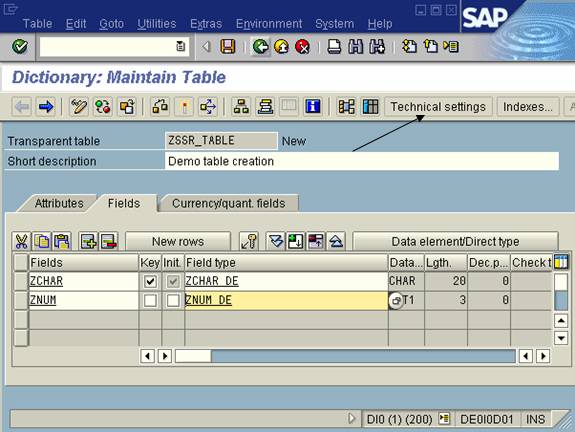
  1. Now we created two fields. And Data elements and Domain for these two fields.

Now we have to maintain the technical settings. Press on Technical settings button.
  1. Give the data class and size category of the table as per the requirement.

And press the back button. 

35. Now activate the table by pressing the activate button or CTRL+F3.

36. Press enter.

37. Now you will get the following screen.

38. Now enter the data into table. Go to Utilitiesà Table contents à Create Entries.

39. Now enter the data in the fields and Save it.

40. You will get the following screen after clicking the Reset Button.

  • Related Posts

    Section 16 of CDS: Utilizing Built-In Features in CDS IV

    We have discussed SQL functions, unit/currency conversion functions, and date functions in our Built In Functions in CDS section; however, we did not cover the Time function. We’ll pick up…

    Leave a Reply

    Your email address will not be published. Required fields are marked *

    You Missed

    External Debugging of an Application of another SAP User in another Location in another Machine/System

    • By Varad
    • April 12, 2026
    • 74 views
    External Debugging of an Application of another SAP User in another Location in another Machine/System

    Quantum Computing & SAP: Futuristic Possibilities by 2030

    • By Varad
    • April 11, 2026
    • 69 views
    Quantum Computing & SAP: Futuristic Possibilities by 2030

    Top 10 SAP Fiori Apps Every Consultant Should Know in 2026

    • By Varad
    • April 10, 2026
    • 310 views
    Top 10 SAP Fiori Apps Every Consultant Should Know in 2026

    Advanced SAPUI5 – 4 – How to Use the SAPUI5 Hybrid App to Retrieve Weight from the Weigh Bridge/Weigh Scale Bluetooth Device?

    • By Varad
    • April 9, 2026
    • 86 views
    Advanced SAPUI5 – 4 – How to Use the SAPUI5 Hybrid App to Retrieve Weight from the Weigh Bridge/Weigh Scale Bluetooth Device?

    Utilizing Shell Scripts in an ABAP Environment for SAP

    • By Varad
    • April 8, 2026
    • 87 views
    Utilizing Shell Scripts in an ABAP Environment for SAP

    How to Debug SAP ABAP Programs Like a Pro

    • By Varad
    • April 7, 2026
    • 307 views
    How to Debug SAP ABAP Programs Like a Pro