

 Varad
Varad
We learned how to use and access the Google Map APIs within SAP. We expand on using comparable APIs to track the exchange rate in real time in this post. When we refer to “real time,” we mean that it would automatically update at a predetermined interval of time and display the current rate at that point in time. This time, instead of using Google, we would use Yahoo’s API.
Yahoo Finance REST API:
This Yahoo Finance API is structured as follows.

In order to display the exchange rate in real time and to automatically refresh it without requiring us to click the REFRESH button on the screen, we must consume it in SAP. Wouldn’t it be awesome to project the stock value or exchange rate from SAP onto a large wall in a finance organization, where it would be updated in real time for everyone to see?
See what our application is capable of.
Indicate the duration for which you would like the results to be updated.
The output is shown for a specific amount of time.
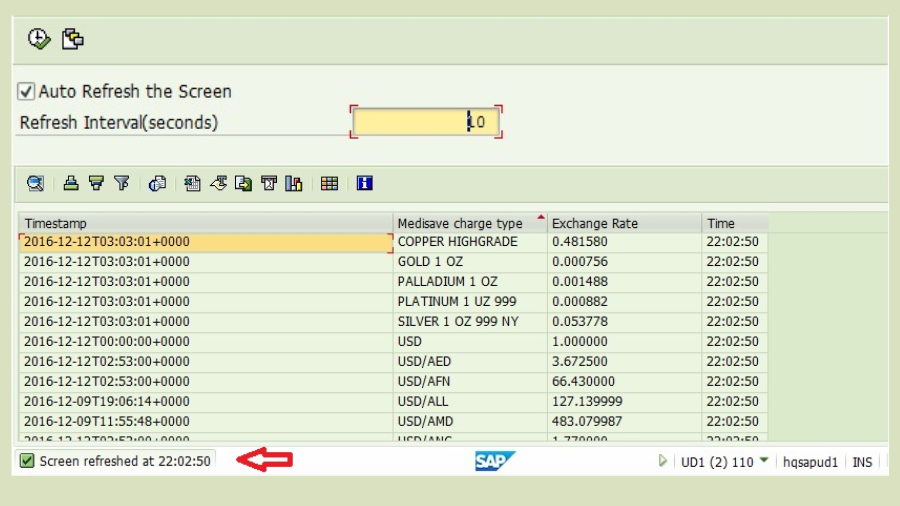
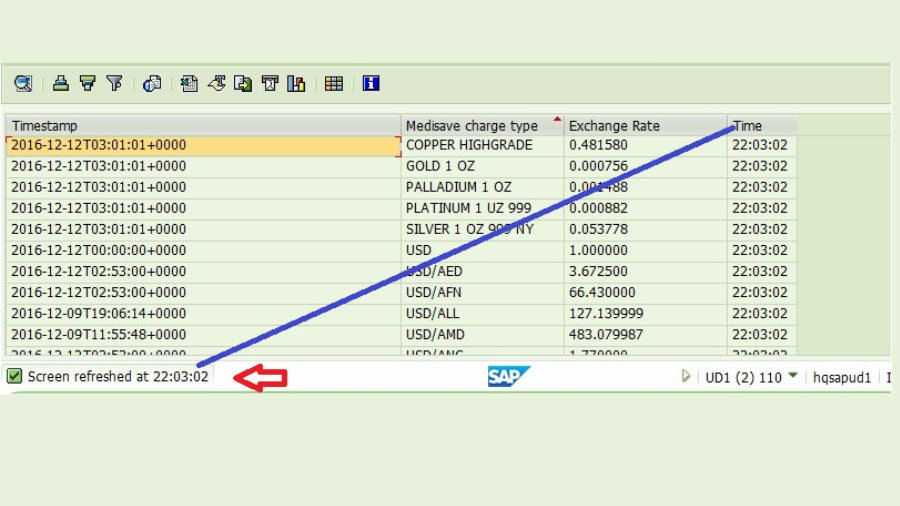
Note that the screen does not include a refresh button. The refresh is managed by our application.
It’s not rocket science. Our task is being completed by Class Method CL_GUI_ALV_GRID->REFRESH_TABLE_DISPLAY.
It is also necessary to give special attention to the Class/Interface CL_GUI_TIMER and Event FINISHED.
Examine the METHOD TIMER_EVENT in the code’s Class CL_AUTO.
METHODS :display_report,
* Define event handling method for event FINISHED of class CL_GUI_TIMER.
timer_event FOR EVENT finished OF cl_gui_timer.
In terms of concepts, what is going on?
The Timer waits for the Interval specified in the selection screen, at which point the Event FINISHED of class CL_GUI_TIMER is raised. The REFRESH logic is put into practice and a listener method for the FINISHED event is established.
Calling CL GUI Timer’s RUN function after REFRESH is a crucial step in reactivating the time.
METHOD timer_event .

DATA: lv_time TYPE char10.

* Get Data
me->get_data( ) .

IF me->ob_grid IS INITIAL .

CALL FUNCTION 'GET_GLOBALS_FROM_SLVC_FULLSCR'
IMPORTING
e_grid = ob_grid.
ELSE.

* Refresh the ALV
CALL METHOD ob_grid->refresh_table_display.

ENDIF.

WRITE sy-uzeit TO lv_time USING EDIT MASK '__:__:__'.

CONCATENATE 'Screen refreshed at' lv_time INTO DATA(lv_msg) SEPARATED BY space.

MESSAGE lv_msg TYPE 'S' . " Get the cuuent timE as message

* Call RUN method of CL_GUI_TIMER again to activate timer
me->ob_timer->run( ) .

ENDMETHOD.
This post is the result of study into how to follow and trace the car of service providers such as Uber, Ola, and so forth. The objective was to make use of the interface/program which we established earlier when we consumed Google Map APIs. Sadly, we were unable to locate any open APIs that could provide the precise location of the cars in real time. However, we eventually came over this API that provided real-time stock and currency rate information.
As a result, we haven’t gone over them again here. Please read through our previous articles if you’re still unclear, or just insert breakpoints into the code and begin debugging. The reasoning is simple.
What more would you like to add to this article? Have you had any problems using Adobe Forms? Would you like to share any actual project specifications or solutions?Do not hesitate to speak up.Kindly share your opinions in the space provided for comments.
I sincerely appreciate your time!
YOU MAY LIKE THIS
ABAP on SAP HANA. Part III. Debugging in ADT
Power of Parallel Cursor in SAP ABAP
OData in SAP ABAP: Streamlining Data Exchange and Integration






