

 Varad
VaradWe learned how to use the Google Map API to obtain the latitude and longitude of any address. To supplement that knowledge, we would discover how to calculate the distance between two addresses in this post. Additionally, we would examine how to determine the turn-by-turn directions between two provided addresses. We would also launch a SAP browser and plot the path between two locations on a map to increase the pleasure.
Is this fascinating, in your opinion? 🙂
In a nutshell, this tool would work in SAP much like a GPS, allowing you to get coordinates (Latitudes/Longitudes), a route, and a map with comprehensive directions.
The first radio button: Distance & Coordinates
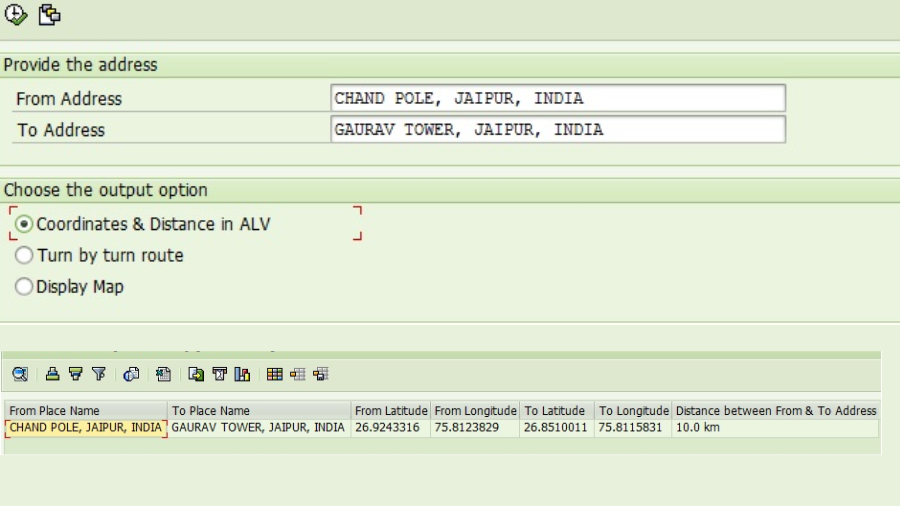
We get the Coordinates of two addresses and also the distance between them.
II. Second Radio button: Turn by turn route
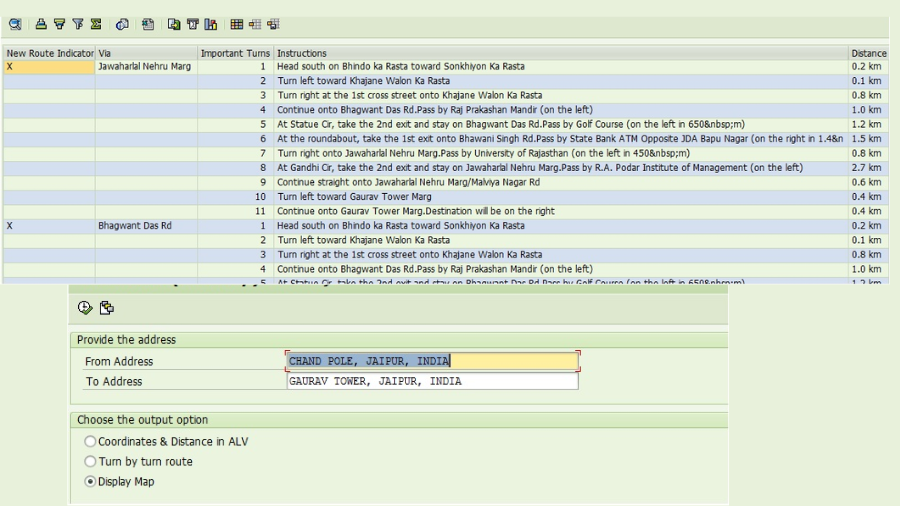
You would receive a comprehensive breakdown of the route from the source to the destination address from the tool. If accessible, it would also give you several paths.
II. Let’s select the “Display Map” radio button, which is the third one.
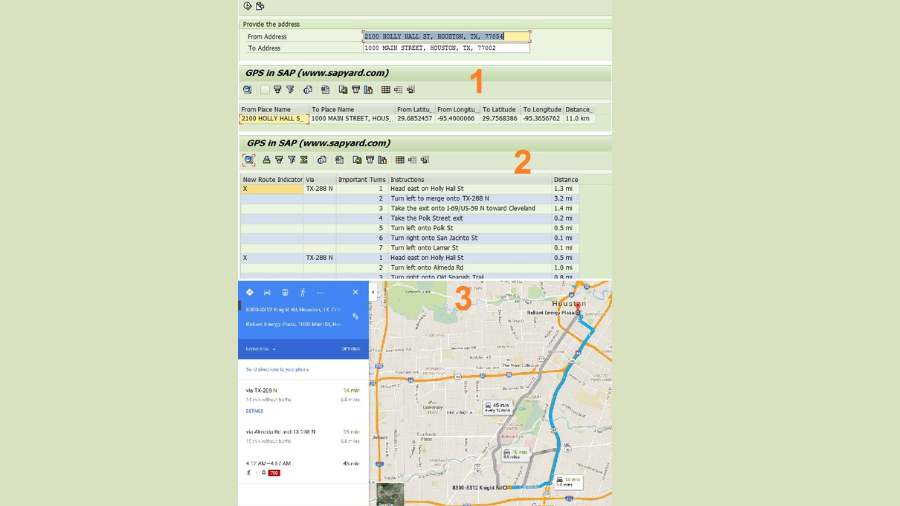
This GPS Tool would show the map and the routes in a web browser as asked. Look into this.

Did you find it enjoyable?
You can try it out for yourself by using the code snippet that is provided at the conclusion of this post. This code would function just the way it is.
We must make three API calls in order to get the three output options. As previously mentioned, in order to finish the API URL and obtain the XML data, we concatenate the strings with the source and destination addresses, latitudes, longitudes, etc. We already know the trick: scanning the XML data and identifying the information that is required.
a) Coordinate GeoCode API String:
* Prepare the url of the GeoCode API
  CONCATENATE
    'http://maps.google.com/maps/api/geocode/xml?address='
    lv_address
    INTO lv_http_url .
b) Distance Matrix API String for retrieving the distance between Coordinates:
* Prepare the url for the DistanceMatrix API using From Address Coordinates and To Address Coordinates
  CONCATENATE
    'http://maps.googleapis.com/maps/api/distancematrix/xml?origins='
    <fs_dest>-place_f '|' <fs_dest>-lat_f ',' <fs_dest>-lng_f ','
    '&destinations=' <fs_dest>-place_t '|' <fs_dest>-lat_t ',' <fs_dest>-lng_t
    '&alternatives=' 'true'
    INTO lv_http_url .
c) Directions API String to trace the route on the Map:
* Prepare the url for Directions API for the From Address Coordinates and To Address Coordinates
  CONCATENATE
    'http://maps.googleapis.com/maps/api/directions/xml?origin='
    <fs_dest>-place_f '|' <fs_dest>-lat_f ',' <fs_dest>-lng_f
    '&destination=' <fs_dest>-place_t '|' <fs_dest>-lat_t ',' <fs_dest>-lng_t
    '&alternatives=' 'true'
    INTO lv_http_url .
where:
lv_address = From/To address
<fs_dest>-place_f = From address
<fs_dest>-lat_f = From address latitude
<fs_dest>-lng_f = From address longitude
<fs_dest>-place_t = To address
<fs_dest>-lat_t = To address latitude
<fs_dest>-lng_t = To address longitude
Use this cl_http_client class and the create_by_url function to obtain the detailed information after you have the relevant API URL.
* Get client from url
  CALL METHOD cl_http_client=>create_by_url
    EXPORTING
      url                = lv_http_url
    IMPORTING
      client             = p_http_client
    EXCEPTIONS
      argument_not_found = 1
      plugin_not_active  = 2
      internal_error     = 3
      OTHERS             = 4.
Please review the detailed code to see how it functions. We merely intended to illustrate the options. There may be more efficient ways to read these APIs and XML data. You can investigate further to determine the best course of action.
Please feel free to contact us or ask a question in the comment section if you need help understanding the code or an idea. Without a doubt, we would react.
Would you kindly click the share buttons if you enjoyed this post?
I sincerely appreciate your time!
you may be interested in this blog here:-
How Many Employees Does Salesforce Have in 2024?






